Configuring ConnectWise and MSP Process to Communicate with One Another
NOTE: Before completing the steps in this KB article, please setup a Security Role in ConnectWise that has the permissions outlined in this KB article.…
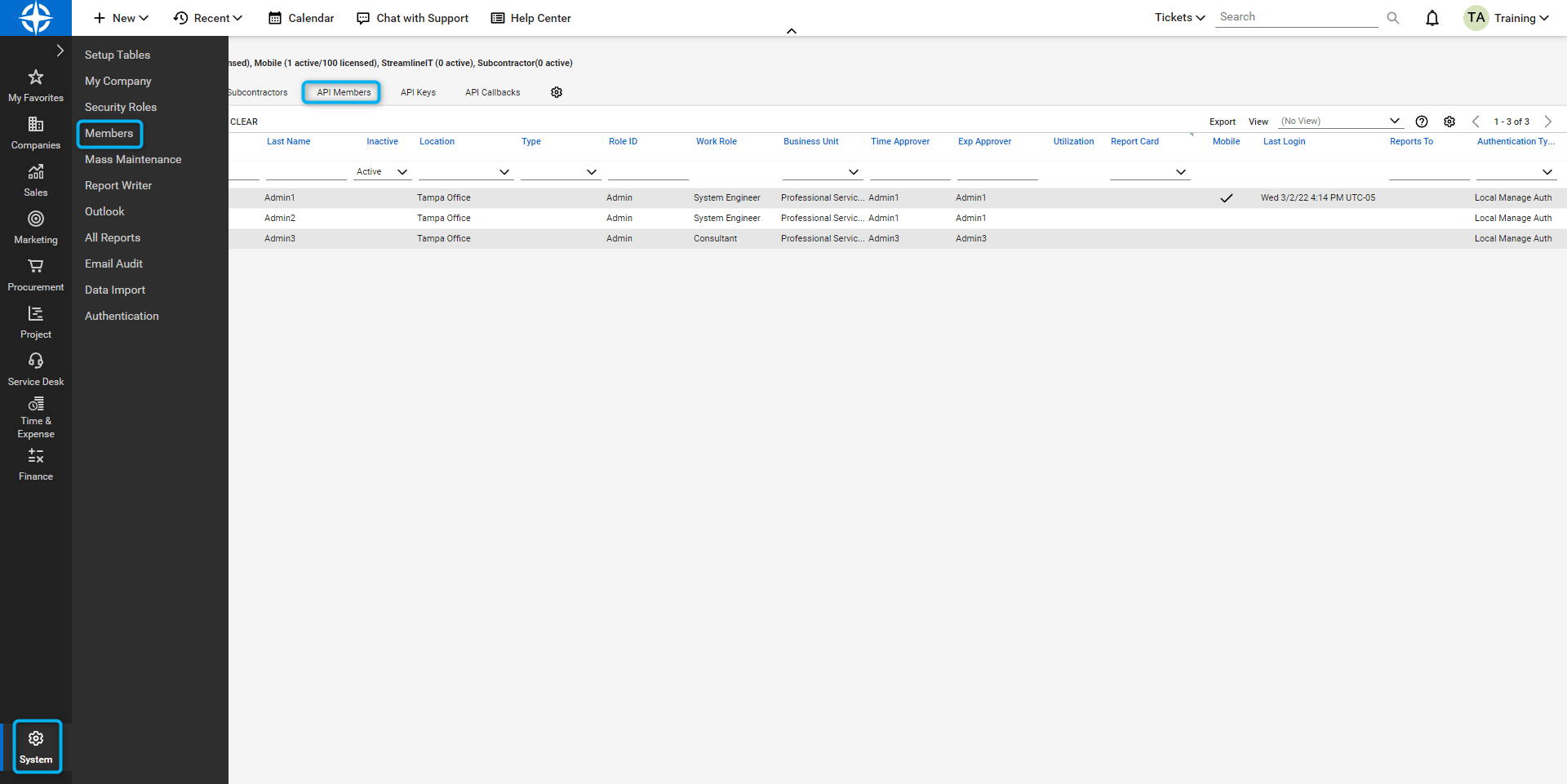
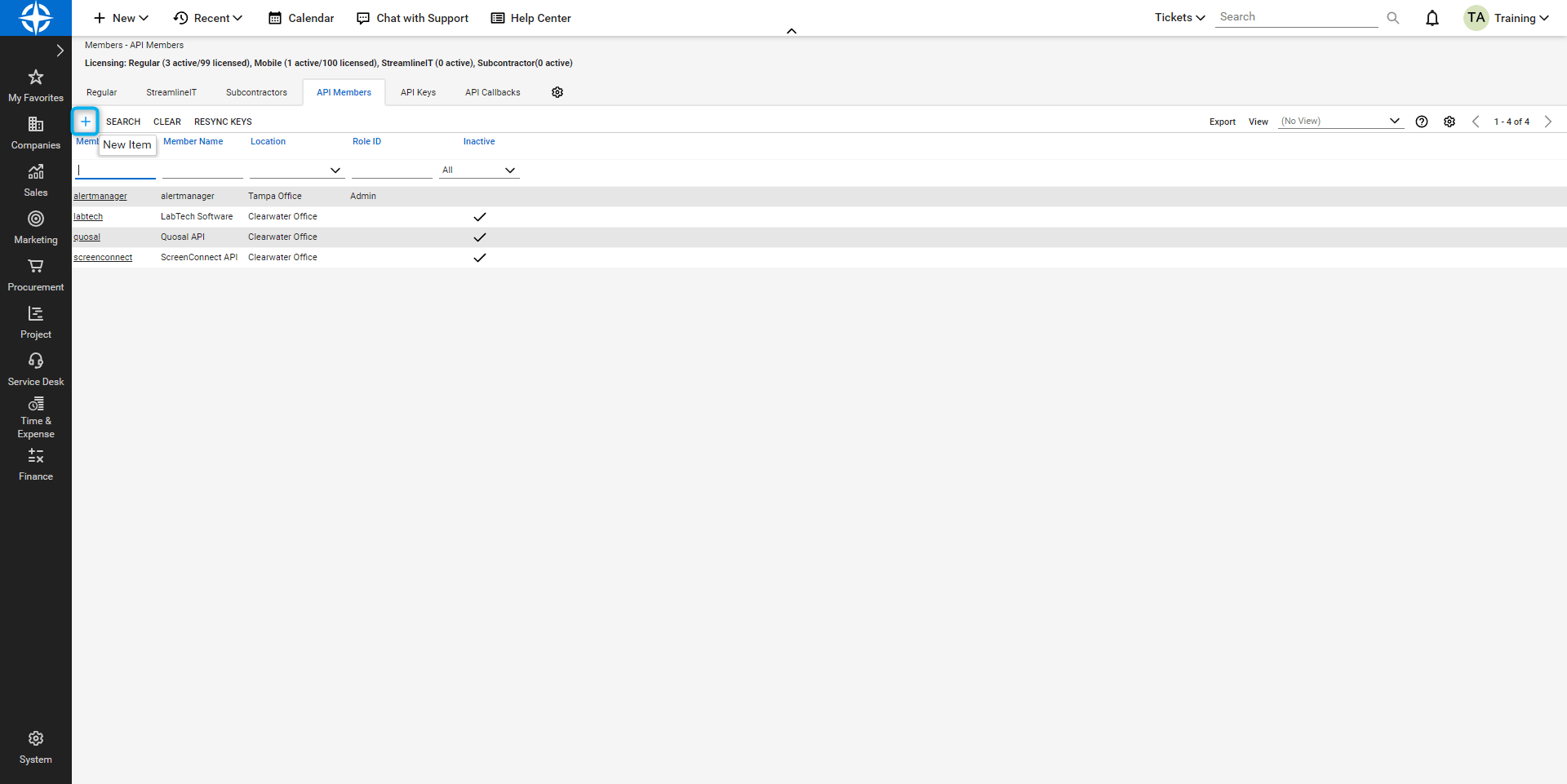
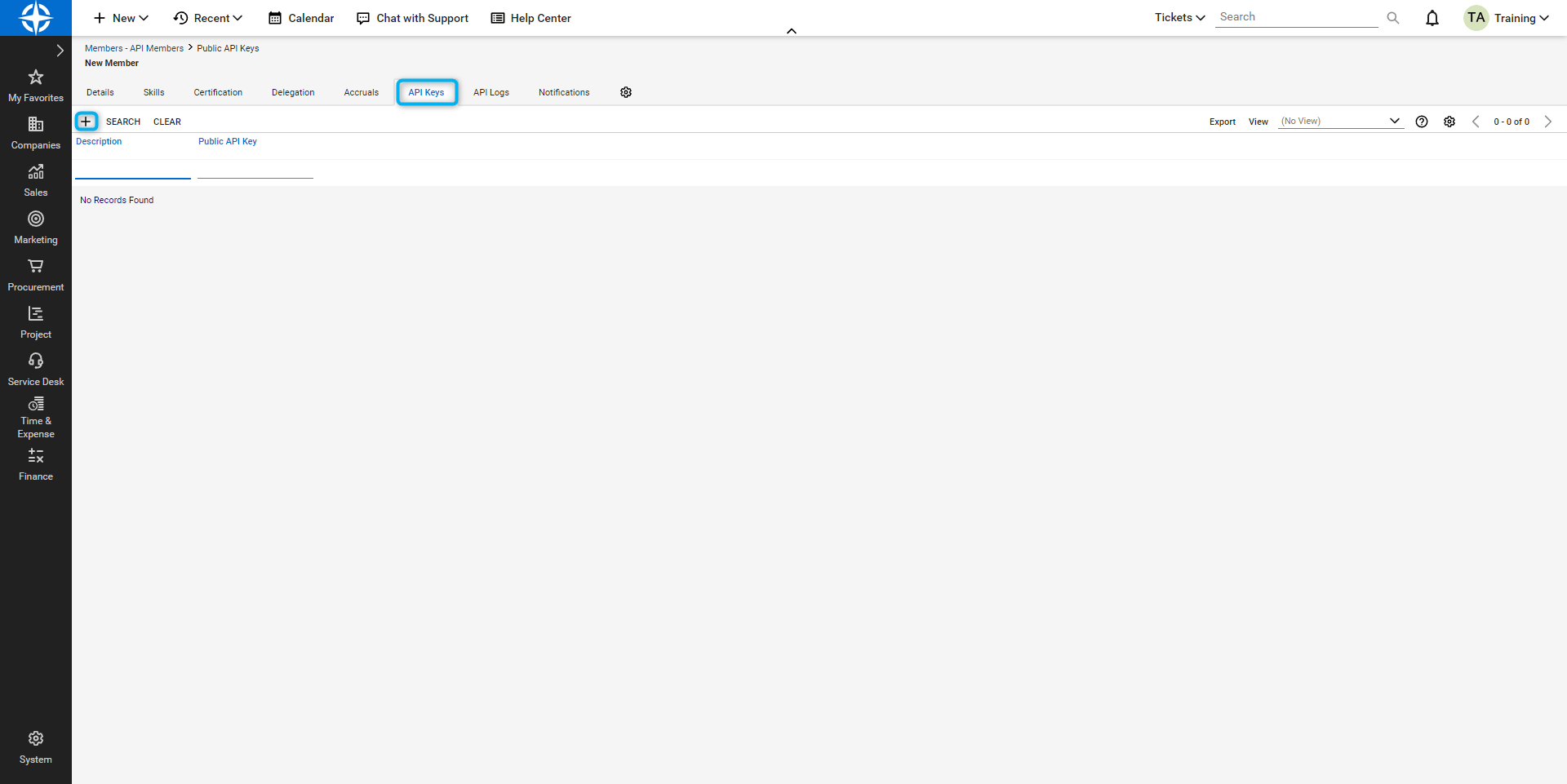
NOTE: Before completing the steps in this KB article, please setup a Security Role in ConnectWise that has the permissions outlined in this KB article.Login to ConnectWise as an Admin and select System -> Members -> API Members as shown below: Click on + as shown below: Fill out all required fields - including specifying the Role as the one you created earlier - and click the Save button.Click on API Keys and then click on the + sign to add a new key: Give it a description and click Save: The keys will disappear after you click save and close so copy both now to a document or directly into MSP Process before you save and close in ConnectWise. Now login to MSP Process and navigate to Settings -> Integrations -> PSA Integrations. Click the Add PSA button: Select ConnectWiseEnter your PSA Connection Details: The next screen will have you select all your ticket settings. You will need to click Validation after selection and then submit. All fields shown below are required. The other fields are optional.
⌘I
{"docsConfig":{"theme":"almond","$schema":"https://mintlify.com/docs.json","name":"Triggr University","description":"Set up and run Triggr Core and Triggr Studio, and connect the tools your workflows use.","colors":{"primary":"#4A7FC7","light":"#6A9FE0","dark":"#3A6CB5"},"logo":{"light":"https://mintcdn.com/triggr/dXDzJtUmPBaHtkPV/logo/msp-process-light.png?fit=max\u0026auto=format\u0026n=dXDzJtUmPBaHtkPV\u0026q=85\u0026s=17a36d837b83a230254e3e7f6b1553fd","dark":"https://mintcdn.com/triggr/dXDzJtUmPBaHtkPV/logo/msp-process-dark.png?fit=max\u0026auto=format\u0026n=dXDzJtUmPBaHtkPV\u0026q=85\u0026s=4d9cef71289332e83394ec9c6357ac63"},"favicon":"https://mintcdn.com/triggr/MwzXHG3UWzFixdSz/favicon.svg?fit=max\u0026auto=format\u0026n=MwzXHG3UWzFixdSz\u0026q=85\u0026s=c356f429061b4109f2c5aeb090381353","appearance":{"default":"dark"},"background":{"color":{"light":"#FFFFFF","dark":"#0F0F17"}},"fonts":{"heading":{"family":"Geist","weight":500},"body":{"family":"Geist","weight":400}},"contextual":{"options":["copy","view","chatgpt","claude","mcp","add-mcp","cursor","vscode"],"display":"header"},"styling":{"latex":true},"navigation":{"pages":[]}},"deployment":{"deploymentMetadataValue":{"subdomain":"triggr","hasAudioNarration":false,"actualSubdomain":"triggr","customDomains":["kb.mspprocess.com"],"gitSource":{"type":"github","owner":"phishr-ai","repo":"triggr-university","deployBranch":"main","contentDirectory":"","isPrivate":true,"mountPath":"","label":""},"entitlements":{"AI_CHAT":{"status":"DISABLED"},"WEB_MCP":{"status":"DISABLED"},"NARRATION":{"status":"DISABLED"}},"buildId":"6af76c587b1d5fddacc840cf","clientVersion":"0.0.4138","searchFilterCounts":[{"language":"default","tag":"Triggr","count":233},{"language":"default","tag":"MSP Process","count":148},{"language":"default","tag":"Integrations","count":104},{"language":"default","tag":"API reference","count":50},{"language":"default","tag":"Triggr Core","count":50},{"language":"default","tag":"Endpoints","count":49},{"language":"default","tag":"Triggr Studio","count":34},{"language":"default","tag":"Workflows","count":33},{"language":"default","tag":"Settings","count":33},{"language":"default","tag":"AI Service Desk","count":26}]},"assistantConfig":{"enableAskAiButton":false,"enableStarterQuestions":false,"enableContextualStarterQuestions":false,"enableAskAiSearchBar":true},"basePath":"","hasChatPermissions":false,"hasWebMcpPermissions":false,"toggles":[{"name":"kill-isr","enabled":true,"variant":{"name":"disabled","enabled":false,"feature_enabled":true},"impressionData":false},{"name":"custom-rbac-roles","enabled":true,"variant":{"name":"disabled","enabled":false,"feature_enabled":true},"impressionData":false},{"name":"agent-mintlify-slack","enabled":true,"variant":{"name":"disabled","enabled":false,"feature_enabled":true},"impressionData":false},{"name":"agent-integrations-settings","enabled":true,"variant":{"name":"disabled","enabled":false,"feature_enabled":true},"impressionData":false},{"name":"rbac-expansion","enabled":true,"variant":{"name":"disabled","enabled":false,"feature_enabled":true},"impressionData":false},{"name":"automations-pr-grouping","enabled":true,"variant":{"name":"disabled","enabled":false,"feature_enabled":true},"impressionData":false},{"name":"custom-prefix","enabled":true,"variant":{"name":"disabled","enabled":false,"feature_enabled":true},"impressionData":false},{"name":"analytics-v7","enabled":true,"variant":{"name":"disabled","enabled":false,"feature_enabled":true},"impressionData":false},{"name":"user-flows-analytics","enabled":true,"variant":{"name":"disabled","enabled":false,"feature_enabled":true},"impressionData":false},{"name":"no-publish-flow","enabled":true,"variant":{"name":"disabled","enabled":false,"feature_enabled":true},"impressionData":false},{"name":"workos-onboarding","enabled":true,"variant":{"name":"disabled","enabled":false,"feature_enabled":true},"impressionData":false},{"name":"snapshot-serving-live","enabled":true,"variant":{"name":"disabled","enabled":false,"feature_enabled":true},"impressionData":false},{"name":"stripTemperatureMiddleware","enabled":true,"variant":{"name":"disabled","enabled":false,"feature_enabled":true},"impressionData":false},{"name":"support-platform-pylon-zendesk","enabled":true,"variant":{"name":"disabled","enabled":false,"feature_enabled":true},"impressionData":false},{"name":"snapshot-serving","enabled":true,"variant":{"name":"disabled","enabled":false,"feature_enabled":true},"impressionData":false},{"name":"instant-rollback","enabled":true,"variant":{"name":"disabled","enabled":false,"feature_enabled":true},"impressionData":false},{"name":"granular-notifications-server","enabled":true,"variant":{"name":"disabled","enabled":false,"feature_enabled":true},"impressionData":false},{"name":"granular-notifications","enabled":true,"variant":{"name":"disabled","enabled":false,"feature_enabled":true},"impressionData":false},{"name":"automations-fable","enabled":true,"variant":{"name":"disabled","enabled":false,"feature_enabled":true},"impressionData":false},{"name":"fixed-ai-action-pricing","enabled":true,"variant":{"name":"disabled","enabled":false,"feature_enabled":true},"impressionData":false},{"name":"automation-resolve-merge-conflict","enabled":true,"variant":{"name":"disabled","enabled":false,"feature_enabled":true},"impressionData":false},{"name":"scoped-publishing","enabled":true,"variant":{"name":"disabled","enabled":false,"feature_enabled":true},"impressionData":false},{"name":"mintql","enabled":true,"variant":{"name":"disabled","enabled":false,"feature_enabled":true},"impressionData":false},{"name":"page-level-analytics","enabled":true,"variant":{"name":"disabled","enabled":false,"feature_enabled":true},"impressionData":false},{"name":"editor-version-history-v2","enabled":true,"variant":{"name":"disabled","enabled":false,"feature_enabled":true},"impressionData":false},{"name":"billing-page-v2","enabled":true,"variant":{"name":"disabled","enabled":false,"feature_enabled":true},"impressionData":false},{"name":"full-page-search","enabled":true,"variant":{"name":"disabled","enabled":false,"feature_enabled":true},"impressionData":false},{"name":"workspace-projects","enabled":true,"variant":{"name":"disabled","enabled":false,"feature_enabled":true},"impressionData":false},{"name":"assistant-v5","enabled":true,"variant":{"name":"disabled","enabled":false,"feature_enabled":true},"impressionData":false},{"name":"fork-pr-previews","enabled":true,"variant":{"name":"disabled","enabled":false,"feature_enabled":true},"impressionData":false},{"name":"revalidation-jwt","enabled":true,"variant":{"name":"disabled","enabled":false,"feature_enabled":true},"impressionData":false},{"name":"workos-sso-scim","enabled":true,"variant":{"name":"disabled","enabled":false,"feature_enabled":true},"impressionData":false},{"name":"hobby-abuse-scan","enabled":true,"variant":{"name":"disabled","enabled":false,"feature_enabled":true},"impressionData":false},{"name":"dashboard-inbox","enabled":true,"variant":{"name":"disabled","enabled":false,"feature_enabled":true},"impressionData":false},{"name":"workos-signup","enabled":true,"variant":{"name":"disabled","enabled":false,"feature_enabled":true},"impressionData":false},{"name":"turbopuffer-dual-write","enabled":true,"variant":{"name":"disabled","enabled":false,"feature_enabled":true},"impressionData":false},{"name":"workos-enabled","enabled":true,"variant":{"name":"disabled","enabled":false,"feature_enabled":true},"impressionData":false},{"name":"approve-review-flow","enabled":true,"variant":{"name":"disabled","enabled":false,"feature_enabled":true},"impressionData":false},{"name":"editor-metadata","enabled":true,"variant":{"name":"disabled","enabled":false,"feature_enabled":true},"impressionData":false},{"name":"sso-setup-deadline-banner","enabled":true,"variant":{"name":"disabled","enabled":false,"feature_enabled":true},"impressionData":false},{"name":"turbopuffer-serve","enabled":true,"variant":{"name":"disabled","enabled":false,"feature_enabled":true},"impressionData":false},{"name":"live-agents","enabled":true,"variant":{"name":"disabled","enabled":false,"feature_enabled":true},"impressionData":false},{"name":"llms-txt-v2","enabled":true,"variant":{"name":"disabled","enabled":false,"feature_enabled":true},"impressionData":false}],"googleFontsInlined":true},"customCss":[{"filePath":"custom.css","content":"#page-title,#content h2,#content h3,#content h4{font-weight:500}html:root{background:#EEEEF2!important}html.dark:root{background:#08080E!important}"}],"page":{"pagePath":"msp-process/settings/psa-integrations/connectwise/configuring-connectwise-and-msp-process-to-communicate-with-one-another","slug":"/msp-process/settings/psa-integrations/connectwise/configuring-connectwise-and-msp-process-to-communicate-with-one-another","pageMetadata":{"title":"Configuring ConnectWise and MSP Process to Communicate with One Another","description":"NOTE: Before completing the steps in this KB article, please setup a Security Role in ConnectWise that has the permissions outlined in this KB article.…","href":"/msp-process/settings/psa-integrations/connectwise/configuring-connectwise-and-msp-process-to-communicate-with-one-another"},"description":{"compiledSource":"\"use strict\";\nconst {jsx: _jsx} = arguments[0];\nconst {useMDXComponents: _provideComponents} = arguments[0];\nfunction _createMdxContent(props) {\n const _components = {\n p: \"p\",\n ..._provideComponents(),\n ...props.components\n };\n return _jsx(_components.p, {\n children: \"NOTE: Before completing the steps in this KB article, please setup a Security Role in ConnectWise that has the permissions outlined in this KB article.…\"\n });\n}\nfunction MDXContent(props = {}) {\n const {wrapper: MDXLayout} = {\n ..._provideComponents(),\n ...props.components\n };\n return MDXLayout ? _jsx(MDXLayout, {\n ...props,\n children: _jsx(_createMdxContent, {\n ...props\n })\n }) : _createMdxContent(props);\n}\nreturn {\n default: MDXContent\n};\n","frontmatter":{},"scope":{}},"pageType":"default","mdx":{"mdxSource":{"compiledSource":"\"use strict\";const{Fragment:_Fragment,jsx:_jsx,jsxs:_jsxs}=arguments[0];const{useMDXComponents:_provideComponents}=arguments[0];function _createMdxContent(props){const _components={a:`a`,em:`em`,p:`p`,strong:`strong`,..._provideComponents(),...props.components},{OptimizedImage}=_components;if(!OptimizedImage)_missingMdxReference(`OptimizedImage`,true);return _jsxs(_Fragment,{children:[_jsxs(_components.p,{children:[`NOTE: Before completing the steps in this KB article, please setup a Security Role in ConnectWise that has the permissions outlined in `,_jsx(_components.a,{href:`/msp-process/settings/psa-integrations/connectwise/connectwise-security-role-details`,children:`this KB article`}),`.`]}),`\n`,_jsxs(_components.p,{children:[`Login to ConnectWise as an Admin and select `,_jsx(_components.strong,{children:`System -> Members -> API Members`}),` as shown below:\\xA0`]}),`\n`,_jsx(OptimizedImage,{src:`https://mintcdn.com/triggr/o9r5jEtjdR2oUtiW/images/msp-process-kb/c135ec0ae468.png?fit=max\u0026auto=format\u0026n=o9r5jEtjdR2oUtiW\u0026q=85\u0026s=cddf0378b5a59018a8cf1c546d0e1623`,alt:``,\"data-og-width\":`1920`,width:`1920`,\"data-og-height\":`961`,height:`961`,\"data-path\":`images/msp-process-kb/c135ec0ae468.png`,\"data-optimize\":`true`,\"data-opv\":`3`,srcset:`https://mintcdn.com/triggr/o9r5jEtjdR2oUtiW/images/msp-process-kb/c135ec0ae468.png?w=280\u0026fit=max\u0026auto=format\u0026n=o9r5jEtjdR2oUtiW\u0026q=85\u0026s=735292fe39e8a5da04d489346fa9e42d 280w, https://mintcdn.com/triggr/o9r5jEtjdR2oUtiW/images/msp-process-kb/c135ec0ae468.png?w=560\u0026fit=max\u0026auto=format\u0026n=o9r5jEtjdR2oUtiW\u0026q=85\u0026s=93c8cf2a6d12ca97dcfe384ac7496aa0 560w, https://mintcdn.com/triggr/o9r5jEtjdR2oUtiW/images/msp-process-kb/c135ec0ae468.png?w=840\u0026fit=max\u0026auto=format\u0026n=o9r5jEtjdR2oUtiW\u0026q=85\u0026s=4a3ca84f7fbab954063057b91e34eca1 840w, https://mintcdn.com/triggr/o9r5jEtjdR2oUtiW/images/msp-process-kb/c135ec0ae468.png?w=1100\u0026fit=max\u0026auto=format\u0026n=o9r5jEtjdR2oUtiW\u0026q=85\u0026s=355246527f99ff990faba34649935822 1100w, https://mintcdn.com/triggr/o9r5jEtjdR2oUtiW/images/msp-process-kb/c135ec0ae468.png?w=1650\u0026fit=max\u0026auto=format\u0026n=o9r5jEtjdR2oUtiW\u0026q=85\u0026s=a2dd571e191929b755feaed7a508618e 1650w, https://mintcdn.com/triggr/o9r5jEtjdR2oUtiW/images/msp-process-kb/c135ec0ae468.png?w=2500\u0026fit=max\u0026auto=format\u0026n=o9r5jEtjdR2oUtiW\u0026q=85\u0026s=b5510c497808b7a1c5caf88bfa690763 2500w`}),`\n`,_jsx(_components.p,{children:`Click on + as shown below:\\xA0`}),`\n`,_jsx(OptimizedImage,{src:`https://mintcdn.com/triggr/dXDzJtUmPBaHtkPV/images/msp-process-kb/ff21f8b52cc9.png?fit=max\u0026auto=format\u0026n=dXDzJtUmPBaHtkPV\u0026q=85\u0026s=d7760e93387bae46a76959ee248174dc`,alt:``,\"data-og-width\":`1920`,width:`1920`,\"data-og-height\":`961`,height:`961`,\"data-path\":`images/msp-process-kb/ff21f8b52cc9.png`,\"data-optimize\":`true`,\"data-opv\":`3`,srcset:`https://mintcdn.com/triggr/dXDzJtUmPBaHtkPV/images/msp-process-kb/ff21f8b52cc9.png?w=280\u0026fit=max\u0026auto=format\u0026n=dXDzJtUmPBaHtkPV\u0026q=85\u0026s=ae85ecea585ed0439e23ee3b90840331 280w, https://mintcdn.com/triggr/dXDzJtUmPBaHtkPV/images/msp-process-kb/ff21f8b52cc9.png?w=560\u0026fit=max\u0026auto=format\u0026n=dXDzJtUmPBaHtkPV\u0026q=85\u0026s=9ff9c3fa91f8ba48b474e89a993c3344 560w, https://mintcdn.com/triggr/dXDzJtUmPBaHtkPV/images/msp-process-kb/ff21f8b52cc9.png?w=840\u0026fit=max\u0026auto=format\u0026n=dXDzJtUmPBaHtkPV\u0026q=85\u0026s=4730c6aa262d2ac8c4e866496a6ff38c 840w, https://mintcdn.com/triggr/dXDzJtUmPBaHtkPV/images/msp-process-kb/ff21f8b52cc9.png?w=1100\u0026fit=max\u0026auto=format\u0026n=dXDzJtUmPBaHtkPV\u0026q=85\u0026s=52f493c5a9c08d45e06bb2ca335f324c 1100w, https://mintcdn.com/triggr/dXDzJtUmPBaHtkPV/images/msp-process-kb/ff21f8b52cc9.png?w=1650\u0026fit=max\u0026auto=format\u0026n=dXDzJtUmPBaHtkPV\u0026q=85\u0026s=0267f8d209375957eacfc0541867bf11 1650w, https://mintcdn.com/triggr/dXDzJtUmPBaHtkPV/images/msp-process-kb/ff21f8b52cc9.png?w=2500\u0026fit=max\u0026auto=format\u0026n=dXDzJtUmPBaHtkPV\u0026q=85\u0026s=027c072cc671332feaa2a616f08d7741 2500w`}),`\n`,_jsxs(_components.p,{children:[`Fill out all required fields - including specifying the Role as the one you created earlier - and click the `,_jsx(_components.strong,{children:`Save`}),` button.`]}),`\n`,_jsx(_components.p,{children:`Click on API Keys and then click on the + sign to add a new key:\\xA0`}),`\n`,_jsx(OptimizedImage,{src:`https://mintcdn.com/triggr/2kaOQdWPjLF3xX8p/images/msp-process-kb/18ff6363d69d.png?fit=max\u0026auto=format\u0026n=2kaOQdWPjLF3xX8p\u0026q=85\u0026s=2a83c86bc37d53d1ac588583018b1f5b`,alt:``,\"data-og-width\":`1920`,width:`1920`,\"data-og-height\":`961`,height:`961`,\"data-path\":`images/msp-process-kb/18ff6363d69d.png`,\"data-optimize\":`true`,\"data-opv\":`3`,srcset:`https://mintcdn.com/triggr/2kaOQdWPjLF3xX8p/images/msp-process-kb/18ff6363d69d.png?w=280\u0026fit=max\u0026auto=format\u0026n=2kaOQdWPjLF3xX8p\u0026q=85\u0026s=7127d30ae87a30b6b37e22a14372b860 280w, https://mintcdn.com/triggr/2kaOQdWPjLF3xX8p/images/msp-process-kb/18ff6363d69d.png?w=560\u0026fit=max\u0026auto=format\u0026n=2kaOQdWPjLF3xX8p\u0026q=85\u0026s=1d0853be2ed7c1978960b75f75c7a245 560w, https://mintcdn.com/triggr/2kaOQdWPjLF3xX8p/images/msp-process-kb/18ff6363d69d.png?w=840\u0026fit=max\u0026auto=format\u0026n=2kaOQdWPjLF3xX8p\u0026q=85\u0026s=c0bedcc88bfb144a1a77472180c6786a 840w, https://mintcdn.com/triggr/2kaOQdWPjLF3xX8p/images/msp-process-kb/18ff6363d69d.png?w=1100\u0026fit=max\u0026auto=format\u0026n=2kaOQdWPjLF3xX8p\u0026q=85\u0026s=e29c3193d05a2f0a8b9f8fb051ed95d3 1100w, https://mintcdn.com/triggr/2kaOQdWPjLF3xX8p/images/msp-process-kb/18ff6363d69d.png?w=1650\u0026fit=max\u0026auto=format\u0026n=2kaOQdWPjLF3xX8p\u0026q=85\u0026s=5686eab76708282e95f382bc432ddc48 1650w, https://mintcdn.com/triggr/2kaOQdWPjLF3xX8p/images/msp-process-kb/18ff6363d69d.png?w=2500\u0026fit=max\u0026auto=format\u0026n=2kaOQdWPjLF3xX8p\u0026q=85\u0026s=50423073c12da822e794e0db50ffb71f 2500w`}),`\n`,_jsx(OptimizedImage,{src:`https://mintcdn.com/triggr/2kaOQdWPjLF3xX8p/images/msp-process-kb/18ff6363d69d.png?fit=max\u0026auto=format\u0026n=2kaOQdWPjLF3xX8p\u0026q=85\u0026s=2a83c86bc37d53d1ac588583018b1f5b`,alt:``,\"data-og-width\":`1920`,width:`1920`,\"data-og-height\":`961`,height:`961`,\"data-path\":`images/msp-process-kb/18ff6363d69d.png`,\"data-optimize\":`true`,\"data-opv\":`3`,srcset:`https://mintcdn.com/triggr/2kaOQdWPjLF3xX8p/images/msp-process-kb/18ff6363d69d.png?w=280\u0026fit=max\u0026auto=format\u0026n=2kaOQdWPjLF3xX8p\u0026q=85\u0026s=7127d30ae87a30b6b37e22a14372b860 280w, https://mintcdn.com/triggr/2kaOQdWPjLF3xX8p/images/msp-process-kb/18ff6363d69d.png?w=560\u0026fit=max\u0026auto=format\u0026n=2kaOQdWPjLF3xX8p\u0026q=85\u0026s=1d0853be2ed7c1978960b75f75c7a245 560w, https://mintcdn.com/triggr/2kaOQdWPjLF3xX8p/images/msp-process-kb/18ff6363d69d.png?w=840\u0026fit=max\u0026auto=format\u0026n=2kaOQdWPjLF3xX8p\u0026q=85\u0026s=c0bedcc88bfb144a1a77472180c6786a 840w, https://mintcdn.com/triggr/2kaOQdWPjLF3xX8p/images/msp-process-kb/18ff6363d69d.png?w=1100\u0026fit=max\u0026auto=format\u0026n=2kaOQdWPjLF3xX8p\u0026q=85\u0026s=e29c3193d05a2f0a8b9f8fb051ed95d3 1100w, https://mintcdn.com/triggr/2kaOQdWPjLF3xX8p/images/msp-process-kb/18ff6363d69d.png?w=1650\u0026fit=max\u0026auto=format\u0026n=2kaOQdWPjLF3xX8p\u0026q=85\u0026s=5686eab76708282e95f382bc432ddc48 1650w, https://mintcdn.com/triggr/2kaOQdWPjLF3xX8p/images/msp-process-kb/18ff6363d69d.png?w=2500\u0026fit=max\u0026auto=format\u0026n=2kaOQdWPjLF3xX8p\u0026q=85\u0026s=50423073c12da822e794e0db50ffb71f 2500w`}),`\n`,_jsx(_components.p,{children:`Give it a description and click Save:\\xA0`}),`\n`,_jsx(_components.p,{children:`The keys will disappear after you click save and close so copy both now to a document or directly into MSP Process before you save and close in ConnectWise.\\xA0`}),`\n`,_jsxs(_components.p,{children:[`Now login to MSP Process and navigate to `,_jsx(_components.strong,{children:`Settings -> Integrations -> PSA Integrations`}),`. Click the `,_jsx(_components.em,{children:`Add PSA`}),` button:\\xA0`]}),`\n`,_jsxs(_components.p,{children:[`Select `,_jsx(_components.strong,{children:`ConnectWise`})]}),`\n`,_jsx(_components.p,{children:`Enter your PSA Connection Details:\\xA0`}),`\n`,_jsx(_components.p,{children:`The next screen will have you select all your ticket settings. You will need to click Validation after selection and then submit. All fields shown below are required. The other fields are optional.\\xA0`})]})}function MDXContent(props={}){const{wrapper:MDXLayout}={..._provideComponents(),...props.components};return MDXLayout?_jsx(MDXLayout,{...props,children:_jsx(_createMdxContent,{...props})}):_createMdxContent(props)}return{default:MDXContent};function _missingMdxReference(id,component){throw new Error(`Expected `+(component?`component`:`object`)+\" `\"+id+\"` to be defined: you likely forgot to import, pass, or provide it.\")}","frontmatter":{},"scope":{"config":{},"pageMetadata":{"title":"Configuring ConnectWise and MSP Process to Communicate with One Another","description":"NOTE: Before completing the steps in this KB article, please setup a Security Role in ConnectWise that has the permissions outlined in this KB article.…","href":"/msp-process/settings/psa-integrations/connectwise/configuring-connectwise-and-msp-process-to-communicate-with-one-another"}}},"mdxSourceWithNoJs":null},"mdxExtracts":{"tableOfContents":[],"codeExamples":{}},"jsLinks":[],"subdomain":"triggr","siteName":"Triggr University","title":"Configuring ConnectWise and MSP Process to Communicate with One Another - Triggr University","navMaps":{"firstHrefInVersion":{},"firstHrefInLanguage":{}},"lastModified":"2026-11-13T20:03:08.132Z","originalFileLocation":"msp-process/settings/psa-integrations/connectwise/configuring-connectwise-and-msp-process-to-communicate-with-one-another.mdx"},"headHtml":"\u003cscript data-mint-head>(function(){var d=document.documentElement,p=null;if(!p){try{p=localStorage.getItem(\"isDarkMode\")}catch(e){}if(p==='true')p='dark';else if(p==='false')p='light';if(p!=='light'\u0026\u0026p!=='dark'\u0026\u0026p!=='system')p=\"dark\"}var r=p==='system'?(matchMedia(\"(prefers-color-scheme: dark)\").matches?'dark':'light'):p;d.classList.remove(r==='dark'?'light':'dark');d.classList.add(r);d.setAttribute(\"data-theme-preference\",p)})();\u003c/script>\u003cmeta data-mint-head name=\"description\" content=\"NOTE: Before completing the steps in this KB article, please setup a Security Role in ConnectWise that has the permissions outlined in this KB article.…\">\u003cmeta data-mint-head name=\"application-name\" content=\"Triggr University\">\u003cmeta data-mint-head name=\"generator\" content=\"Mintlify\">\u003clink data-mint-head rel=\"icon\" type=\"image/png\" sizes=\"192x192\" href=\"/mintlify-assets/_mintlify/favicons/triggr/CuZTa4V6vBELhOxx/_generated/favicon/android-chrome-192x192.png\" media=\"(prefers-color-scheme: light)\">\u003clink data-mint-head rel=\"apple-touch-icon\" type=\"image/png\" sizes=\"180x180\" href=\"/mintlify-assets/_mintlify/favicons/triggr/CuZTa4V6vBELhOxx/_generated/favicon/apple-touch-icon.png\">\u003clink data-mint-head rel=\"icon\" type=\"image/png\" sizes=\"16x16\" href=\"/mintlify-assets/_mintlify/favicons/triggr/CuZTa4V6vBELhOxx/_generated/favicon/favicon-16x16.png\" media=\"(prefers-color-scheme: light)\">\u003clink data-mint-head rel=\"icon\" type=\"image/png\" sizes=\"32x32\" href=\"/mintlify-assets/_mintlify/favicons/triggr/CuZTa4V6vBELhOxx/_generated/favicon/favicon-32x32.png\" media=\"(prefers-color-scheme: light)\">\u003clink data-mint-head rel=\"shortcut icon\" type=\"image/x-icon\" href=\"/mintlify-assets/_mintlify/favicons/triggr/CuZTa4V6vBELhOxx/_generated/favicon/favicon.ico\" media=\"(prefers-color-scheme: light)\">\u003clink data-mint-head rel=\"icon\" type=\"image/png\" sizes=\"192x192\" href=\"/mintlify-assets/_mintlify/favicons/triggr/CuZTa4V6vBELhOxx/_generated/favicon-dark/android-chrome-192x192.png\" media=\"(prefers-color-scheme: dark)\">\u003clink data-mint-head rel=\"icon\" type=\"image/png\" sizes=\"16x16\" href=\"/mintlify-assets/_mintlify/favicons/triggr/CuZTa4V6vBELhOxx/_generated/favicon-dark/favicon-16x16.png\" media=\"(prefers-color-scheme: dark)\">\u003clink data-mint-head rel=\"icon\" type=\"image/png\" sizes=\"32x32\" href=\"/mintlify-assets/_mintlify/favicons/triggr/CuZTa4V6vBELhOxx/_generated/favicon-dark/favicon-32x32.png\" media=\"(prefers-color-scheme: dark)\">\u003clink data-mint-head rel=\"shortcut icon\" type=\"image/x-icon\" href=\"/mintlify-assets/_mintlify/favicons/triggr/CuZTa4V6vBELhOxx/_generated/favicon-dark/favicon.ico\" media=\"(prefers-color-scheme: dark)\">\u003cmeta data-mint-head property=\"og:title\" content=\"Configuring ConnectWise and MSP Process to Communicate with One Another - Triggr University\">\u003cmeta data-mint-head property=\"og:description\" content=\"NOTE: Before completing the steps in this KB article, please setup a Security Role in ConnectWise that has the permissions outlined in this KB article.…\">\u003cmeta data-mint-head property=\"og:site_name\" content=\"Triggr University\">\u003cmeta data-mint-head property=\"og:url\" content=\"https://kb.mspprocess.com/msp-process/settings/psa-integrations/connectwise/configuring-connectwise-and-msp-process-to-communicate-with-one-another\">\u003cmeta data-mint-head property=\"og:type\" content=\"website\">\u003cmeta data-mint-head property=\"og:image\" content=\"https://triggr.mintlify.site/_mintlify/api/og/v2?division=ConnectWise\u0026amp;title=Configuring+ConnectWise+and+MSP+Process+to+Communicate+with+One+Another\u0026amp;description=NOTE%3A+Before+completing+the+steps+in+this+KB+article%2C+please+setup+a+Security+Role+in+ConnectWise+that+has+the+permissions+outlined+in+this+KB+article.%E2%80%A6\u0026amp;theme=e7a72cf8d9edb61355a1be42\u0026amp;signature=5f6f2119eec0d0f5915ae1ae86f6bc582b3418bc37da2263592f864afda481db\">\u003cmeta data-mint-head property=\"og:image:width\" content=\"1200\">\u003cmeta data-mint-head property=\"og:image:height\" content=\"630\">\u003cmeta data-mint-head name=\"twitter:card\" content=\"summary_large_image\">\u003cmeta data-mint-head name=\"twitter:title\" content=\"Configuring ConnectWise and MSP Process to Communicate with One Another - Triggr University\">\u003cmeta data-mint-head name=\"twitter:description\" content=\"NOTE: Before completing the steps in this KB article, please setup a Security Role in ConnectWise that has the permissions outlined in this KB article.…\">\u003cmeta data-mint-head name=\"twitter:image\" content=\"https://triggr.mintlify.site/_mintlify/api/og/v2?division=ConnectWise\u0026amp;title=Configuring+ConnectWise+and+MSP+Process+to+Communicate+with+One+Another\u0026amp;description=NOTE%3A+Before+completing+the+steps+in+this+KB+article%2C+please+setup+a+Security+Role+in+ConnectWise+that+has+the+permissions+outlined+in+this+KB+article.%E2%80%A6\u0026amp;theme=e7a72cf8d9edb61355a1be42\u0026amp;signature=5f6f2119eec0d0f5915ae1ae86f6bc582b3418bc37da2263592f864afda481db\">\u003cmeta data-mint-head name=\"twitter:image:width\" content=\"1200\">\u003cmeta data-mint-head name=\"twitter:image:height\" content=\"630\">\u003cmeta data-mint-head name=\"msapplication-config\" content=\"/mintlify-assets/_mintlify/favicons/triggr/CuZTa4V6vBELhOxx/_generated/favicon/browserconfig.xml\">\u003cmeta data-mint-head name=\"apple-mobile-web-app-title\" content=\"Triggr University\">\u003cmeta data-mint-head name=\"msapplication-TileColor\" content=\"#4A7FC7\">\u003clink data-mint-head rel=\"canonical\" href=\"https://kb.mspprocess.com/msp-process/settings/psa-integrations/connectwise/configuring-connectwise-and-msp-process-to-communicate-with-one-another\">\u003clink data-mint-head rel=\"alternate\" type=\"application/xml\" href=\"/sitemap.xml\">\u003clink data-mint-head rel=\"alternate\" type=\"text/markdown\" href=\"/msp-process/settings/psa-integrations/connectwise/configuring-connectwise-and-msp-process-to-communicate-with-one-another.md\">\u003cscript data-mint-head type=\"application/ld+json\">{\"@context\":\"https://schema.org\",\"@graph\":[{\"@type\":\"Organization\",\"@id\":\"https://kb.mspprocess.com/#organization\",\"name\":\"Triggr University\",\"url\":\"https://kb.mspprocess.com\",\"logo\":{\"@type\":\"ImageObject\",\"url\":\"https://mintcdn.com/triggr/dXDzJtUmPBaHtkPV/logo/msp-process-light.png?fit=max\u0026auto=format\u0026n=dXDzJtUmPBaHtkPV\u0026q=85\u0026s=17a36d837b83a230254e3e7f6b1553fd\"}},{\"@type\":\"WebSite\",\"@id\":\"https://kb.mspprocess.com#website\",\"name\":\"Triggr University\",\"url\":\"https://kb.mspprocess.com\",\"publisher\":{\"@id\":\"https://kb.mspprocess.com/#organization\"}},{\"@type\":\"WebPage\",\"@id\":\"https://kb.mspprocess.com/msp-process/settings/psa-integrations/connectwise/configuring-connectwise-and-msp-process-to-communicate-with-one-another#webpage\",\"url\":\"https://kb.mspprocess.com/msp-process/settings/psa-integrations/connectwise/configuring-connectwise-and-msp-process-to-communicate-with-one-another\",\"name\":\"Configuring ConnectWise and MSP Process to Communicate with One Another\",\"description\":\"NOTE: Before completing the steps in this KB article, please setup a Security Role in ConnectWise that has the permissions outlined in this KB article.…\",\"dateModified\":\"2026-11-13T20:03:08.132Z\",\"isPartOf\":{\"@id\":\"https://kb.mspprocess.com#website\"},\"breadcrumb\":{\"@id\":\"https://kb.mspprocess.com/msp-process/settings/psa-integrations/connectwise/configuring-connectwise-and-msp-process-to-communicate-with-one-another#breadcrumb\"}},{\"@type\":\"BreadcrumbList\",\"@id\":\"https://kb.mspprocess.com/msp-process/settings/psa-integrations/connectwise/configuring-connectwise-and-msp-process-to-communicate-with-one-another#breadcrumb\",\"itemListElement\":[{\"@type\":\"ListItem\",\"position\":1,\"name\":\"Settings\",\"item\":\"https://kb.mspprocess.com/msp-process/settings/setting-up-a-teams-bot-for-use-with-verification\"},{\"@type\":\"ListItem\",\"position\":2,\"name\":\"PSA Integrations\",\"item\":\"https://kb.mspprocess.com/msp-process/settings/psa-integrations/autotask/link-your-msp-process-user-account-to-an-autotask-resource-user\"},{\"@type\":\"ListItem\",\"position\":3,\"name\":\"Configuring ConnectWise and MSP Process to Communicate with One Another\",\"item\":\"https://kb.mspprocess.com/msp-process/settings/psa-integrations/connectwise/configuring-connectwise-and-msp-process-to-communicate-with-one-another\"}]},{\"@type\":[\"Article\",\"TechArticle\"],\"@id\":\"https://kb.mspprocess.com/msp-process/settings/psa-integrations/connectwise/configuring-connectwise-and-msp-process-to-communicate-with-one-another#article\",\"headline\":\"Configuring ConnectWise and MSP Process to Communicate with One Another\",\"name\":\"Configuring ConnectWise and MSP Process to Communicate with One Another\",\"description\":\"NOTE: Before completing the steps in this KB article, please setup a Security Role in ConnectWise that has the permissions outlined in this KB article.…\",\"url\":\"https://kb.mspprocess.com/msp-process/settings/psa-integrations/connectwise/configuring-connectwise-and-msp-process-to-communicate-with-one-another\",\"mainEntityOfPage\":{\"@id\":\"https://kb.mspprocess.com/msp-process/settings/psa-integrations/connectwise/configuring-connectwise-and-msp-process-to-communicate-with-one-another#webpage\"},\"dateModified\":\"2026-11-13T20:03:08.132Z\",\"publisher\":{\"@id\":\"https://kb.mspprocess.com/#organization\"},\"isPartOf\":{\"@id\":\"https://kb.mspprocess.com#website\"}}]}\u003c/script>\u003cscript data-mint-head type=\"application/ld+json\">{\"@context\":\"https://schema.org\",\"@type\":\"WebSite\",\"name\":\"Triggr University\",\"publisher\":{\"@type\":\"Organization\",\"name\":\"Triggr University\"},\"provider\":{\"@type\":\"Organization\",\"name\":\"Mintlify\",\"url\":\"https://mintlify.com\"}}\u003c/script>","agentPointerHref":"/msp-process/settings/psa-integrations/connectwise/configuring-connectwise-and-msp-process-to-communicate-with-one-another.md","siteName":"Triggr University","nav":{"global":null,"tabs":[{"tab":"MSP Process","groups":[{"group":"Get started","pages":[{"title":"MSP Process","href":"/msp-process/overview"}]},{"group":"AI Service Desk","pages":[{"group":"CallScribe","pages":[{"title":"CallScribe: Admin Setup","href":"/msp-process/ai-service-desk/callscribe/callscribe-admin-setup"},{"title":"CallScribe: Daily Use","href":"/msp-process/ai-service-desk/callscribe/callscribe-daily-use"}]},{"group":"Client Portal","pages":[{"title":"Adding Custom Tabs in the Client Portal","href":"/msp-process/ai-service-desk/client-portal/adding-custom-tabs-in-the-client-portal"},{"title":"Client Portal Chat Notifications","href":"/msp-process/ai-service-desk/client-portal/client-portal-chat-notifications"},{"title":"Client Portal: Admin Setup","href":"/msp-process/ai-service-desk/client-portal/client-portal-admin-setup"},{"title":"Conditional Logic for Client Portal Ticket Templates","href":"/msp-process/ai-service-desk/client-portal/conditional-logic-for-client-portal-ticket-templates"},{"title":"Controlling Which End-Users Can See Specific Ticket Templates","href":"/msp-process/ai-service-desk/client-portal/controlling-which-end-users-can-see-specific-ticket-templates"},{"title":"Customize Client Portal Invite Email","href":"/msp-process/ai-service-desk/client-portal/customize-client-portal-invite-email"},{"title":"Embedding a Rewst Workflow inside the MSP Process Client Portal","href":"/msp-process/ai-service-desk/client-portal/embedding-a-rewst-workflow-inside-the-msp-process-client-portal"},{"title":"End-User Single Sign-On (Microsoft 365) Setup for the Client Portal","href":"/msp-process/ai-service-desk/client-portal/end-user-single-sign-on-microsoft-365-setup-for-the-client-portal"},{"title":"How to Add Custom Tabs to Your Microsoft Teams App","href":"/msp-process/ai-service-desk/client-portal/how-to-add-custom-tabs-to-your-microsoft-teams-app"},{"title":"How to Invite Clients to your Client Portal","href":"/msp-process/ai-service-desk/client-portal/how-to-invite-clients-to-your-client-portal"},{"title":"Mobile Apps - for Technicians and End-Users","href":"/msp-process/ai-service-desk/client-portal/mobile-apps-for-technicians-and-end-users"},{"title":"Pre-approving the \"MSP Process SSO\" Enterprise App","href":"/msp-process/ai-service-desk/client-portal/pre-approving-the-msp-process-sso-enterprise-app"},{"title":"Removing a Teams app from a client's setup","href":"/msp-process/ai-service-desk/client-portal/removing-a-teams-app-from-a-clients-setup"},{"title":"Setting up AI ChatAssist","href":"/msp-process/ai-service-desk/client-portal/setting-up-ai-chatassist"},{"title":"Setting Up Client Portal Ticket Templates (with Conditional Logic)","href":"/msp-process/ai-service-desk/client-portal/setting-up-client-portal-ticket-templates-with-conditional-logic"},{"title":"Telling Your Customers How To Contact You","href":"/msp-process/ai-service-desk/client-portal/telling-your-customers-how-to-contact-you"},{"title":"Using a Custom Domain for your Client Portal","href":"/msp-process/ai-service-desk/client-portal/using-a-custom-domain-for-your-client-portal"},{"title":"Using the Client Portal: End-User Guide","href":"/msp-process/ai-service-desk/client-portal/using-the-client-portal-end-user-guide"},{"title":"Using Triggr with your MSP Process","href":"/msp-process/ai-service-desk/client-portal/using-triggr-with-your-msp-process"}]},{"group":"Ticketing","pages":[{"title":"Overview of the Ticket Triage Module","href":"/msp-process/ai-service-desk/ticketing/overview-of-the-ticket-triage-module"}]},{"group":"Live Chat","pages":[{"title":"How to Setup Live Chat","href":"/msp-process/ai-service-desk/live-chat/how-to-setup-live-chat"}]},{"group":"AI VoiceAssist","pages":[{"title":"AI VoiceAssist: Admin Setup","href":"/msp-process/ai-service-desk/ai-voiceassist/ai-voiceassist-admin-setup"},{"title":"Getting Notified If AI VoiceAssist Fails To Create A Ticket","href":"/msp-process/ai-service-desk/ai-voiceassist/getting-notified-if-ai-voiceassist-fails-to-create-a-ticket"},{"title":"Preventing Infinite Call Forwarding Loops with AI VoiceAssist","href":"/msp-process/ai-service-desk/ai-voiceassist/preventing-infinite-call-forwarding-loops-with-ai-voiceassist"}]}]},{"group":"Alpha","pages":[{"title":"Alpha activity log and usage","href":"/msp-process/alpha/alpha-activity-log-and-usage"},{"title":"Alpha AI spend and budget","href":"/msp-process/alpha/alpha-ai-spend-and-budget"},{"title":"Alpha dashboards and cards","href":"/msp-process/alpha/alpha-dashboards-and-cards"},{"title":"Alpha live assist on calls","href":"/msp-process/alpha/alpha-live-assist-on-calls"},{"title":"Alpha permissions and roles","href":"/msp-process/alpha/alpha-permissions-and-roles"},{"title":"Alpha reports: QBRs, saved reports and schedules","href":"/msp-process/alpha/alpha-reports-qbrs-saved-reports-and-schedules"},{"title":"Chatting with Alpha","href":"/msp-process/alpha/chatting-with-alpha"},{"title":"Connecting IT Glue or Hudu to Alpha","href":"/msp-process/alpha/connecting-it-glue-or-hudu-to-alpha"},{"title":"Connecting your PSA to Alpha and choosing what Alpha may change there","href":"/msp-process/alpha/connecting-your-psa-to-alpha-and-choosing-what-alpha-may-change-there"},{"title":"Using Alpha from Claude, ChatGPT, Cursor and other AI apps","href":"/msp-process/alpha/using-alpha-from-claude-chatgpt-cursor-and-other-ai-apps"},{"title":"What is Alpha?","href":"/msp-process/alpha/what-is-alpha"}]},{"group":"SMS Messaging","pages":[{"title":"Add an SMS Channel","href":"/msp-process/sms-messaging/add-an-sms-channel"},{"title":"Broadcast Messsaging Templates","href":"/msp-process/sms-messaging/broadcast-messsaging-templates"},{"title":"Dynamic Filters","href":"/msp-process/sms-messaging/dynamic-filters"},{"title":"Importing a Phone Number from a Twilio Account","href":"/msp-process/sms-messaging/importing-a-phone-number-from-a-twilio-account"},{"title":"Initiate an SMS Conversation from MSP Process Portal","href":"/msp-process/sms-messaging/initiate-an-sms-conversation-from-msp-process-portal"},{"title":"Sending Text Messages in Bulk, Using the Broadcast Messages Feature","href":"/msp-process/sms-messaging/sending-text-messages-in-bulk-using-the-broadcast-messages-feature"},{"title":"SMS Channel Chat View","href":"/msp-process/sms-messaging/sms-channel-chat-view"},{"title":"SMS Channel Configuration","href":"/msp-process/sms-messaging/sms-channel-configuration"},{"title":"Text Message Templates","href":"/msp-process/sms-messaging/text-message-templates"},{"group":"Contact Update Forms","pages":[{"title":"Contact Update Forms - Sending to Individual End-Users","href":"/msp-process/sms-messaging/contact-update-forms/contact-update-forms-sending-to-individual-end-users"},{"title":"Contact Update Forms - Sending to Multiple End-Users at Once","href":"/msp-process/sms-messaging/contact-update-forms/contact-update-forms-sending-to-multiple-end-users-at-once"},{"title":"Customize Contact Update Emails and Text Templates","href":"/msp-process/sms-messaging/contact-update-forms/customize-contact-update-emails-and-text-templates"},{"title":"Migrating Opt-in Data Between PSAs","href":"/msp-process/sms-messaging/contact-update-forms/migrating-opt-in-data-between-psas"}]}]},{"group":"Identity Management","pages":[{"title":"Manager Approvals","href":"/msp-process/identity-management/manager-approvals"},{"title":"Understanding MSP Process' Password Rotation","href":"/msp-process/identity-management/understanding-msp-process-password-rotation"},{"group":"Password Management","pages":[{"title":"Lexful Integration: Admin Setup","href":"/msp-process/identity-management/password-management/lexful-integration-admin-setup"},{"title":"Self-Service Password Reset (SSPR), MFA Reset and Unlocking User Accounts","href":"/msp-process/identity-management/password-management/self-service-password-reset-sspr-mfa-reset-and-unlocking-user-accounts"}]},{"group":"End User Verification","pages":[{"title":"End User Verification using Secure Data Link","href":"/msp-process/identity-management/end-user-verification/end-user-verification-using-secure-data-link"},{"title":"End-User Verification using SMS","href":"/msp-process/identity-management/end-user-verification/end-user-verification-using-sms"},{"title":"How to Disable End-User Verification Methods","href":"/msp-process/identity-management/end-user-verification/how-to-disable-end-user-verification-methods"},{"title":"Setting up Okta as an End-user Verification (EUV) Method","href":"/msp-process/identity-management/end-user-verification/setting-up-okta-as-an-end-user-verification-euv-method"},{"group":"Microsoft Authenticator","pages":[{"title":"Deploying the Microsoft Authenticator Module to a Specific M365 Tenant","href":"/msp-process/identity-management/end-user-verification/microsoft-authenticator/deploying-the-microsoft-authenticator-module-to-a-specific-m365-tenant"},{"title":"Deploying the MSP Process Authenticator app to M365 Tenants through the Microsoft Partner Center","href":"/msp-process/identity-management/end-user-verification/microsoft-authenticator/deploying-the-msp-process-authenticator-app-to-m365-tenants-through-the-microsoft-partner-center"},{"title":"Modifying a user's Default Sign-in Method in M365 to be \"Microsoft Authenticator\"","href":"/msp-process/identity-management/end-user-verification/microsoft-authenticator/modifying-a-users-default-sign-in-method-in-m365-to-be-microsoft-authenticator"},{"title":"Troubleshooting \"Error during assigning of Application.ReadWrite.All application role\" Errors","href":"/msp-process/identity-management/end-user-verification/microsoft-authenticator/troubleshooting-error-during-assigning-of-applicationreadwriteall-application-role-errors"},{"title":"Troubleshooting \"Please enable the 'Azure Multi Factor Auth Client' enterprise application for this M365 tenant\" Errors","href":"/msp-process/identity-management/end-user-verification/microsoft-authenticator/troubleshooting-please-enable-the-azure-multi-factor-auth-client-enterprise-application-for-this-m365-tenant-errors"},{"title":"Verify End Users from MSP Process - v2","href":"/msp-process/identity-management/end-user-verification/microsoft-authenticator/verify-end-users-from-msp-process-v2"},{"title":"Verifying End Users within MSP Process Portal","href":"/msp-process/identity-management/end-user-verification/microsoft-authenticator/verifying-end-users-within-msp-process-portal"}]},{"group":"Duo","pages":[{"title":"DUO: Verifying an End-User By Sending them a Push Notification Through the DUO Mobile App","href":"/msp-process/identity-management/end-user-verification/duo/duo-verifying-an-end-user-by-sending-them-a-push-notification-through-the-duo-mobile-app"}]}]},{"group":"Technician Verification","pages":[{"title":"Deploying the Tech Verification Widget","href":"/msp-process/identity-management/technician-verification/deploying-the-tech-verification-widget"},{"title":"Different Methods to Deploy Tech Verification","href":"/msp-process/identity-management/technician-verification/different-methods-to-deploy-tech-verification"},{"title":"Tech Verification: End-User Guide","href":"/msp-process/identity-management/technician-verification/tech-verification-end-user-guide"},{"title":"Technician Verification - Using SMS","href":"/msp-process/identity-management/technician-verification/technician-verification-using-sms"}]}]},{"group":"Monitor \u0026 Notify","pages":[{"group":"Incidents \u0026 Alerts","pages":[{"title":"Escalation Rules: Admin Setup Guide","href":"/msp-process/monitor-notify/incidents-alerts/escalation-rules-admin-setup-guide"},{"title":"Incident Module \u0026 Escalation Rules: Daily Use Guide","href":"/msp-process/monitor-notify/incidents-alerts/incident-module-escalation-rules-daily-use-guide"}]},{"group":"Data Ingestion \u0026 Workflows","pages":[{"title":"How to Make Ticket URLs Clickable in Microsoft Teams Notifications","href":"/msp-process/monitor-notify/data-ingestion-workflows/how-to-make-ticket-urls-clickable-in-microsoft-teams-notifications"},{"title":"Monitoring External Assets with Uptime Monitors in MSP Process","href":"/msp-process/monitor-notify/data-ingestion-workflows/monitoring-external-assets-with-uptime-monitors-in-msp-process"},{"title":"Notifying On Specific Ticket Details","href":"/msp-process/monitor-notify/data-ingestion-workflows/notifying-on-specific-ticket-details"},{"title":"Receiving Ticket Updates from HaloPSA","href":"/msp-process/monitor-notify/data-ingestion-workflows/receiving-ticket-updates-from-halopsa"},{"title":"Scheduled Entry/Service Call Notification Setup","href":"/msp-process/monitor-notify/data-ingestion-workflows/scheduled-entryservice-call-notification-setup"},{"title":"Sending Notifications to a Slack Channel","href":"/msp-process/monitor-notify/data-ingestion-workflows/sending-notifications-to-a-slack-channel"},{"title":"Understanding Escalations in MSP Process","href":"/msp-process/monitor-notify/data-ingestion-workflows/understanding-escalations-in-msp-process"},{"title":"Understanding Notification Groups. On-Call schedules, and Workflows","href":"/msp-process/monitor-notify/data-ingestion-workflows/understanding-notification-groups-on-call-schedules-and-workflows"},{"title":"Update Purchase Orders to ConnectWise","href":"/msp-process/monitor-notify/data-ingestion-workflows/update-purchase-orders-to-connectwise"}]},{"group":"Scheduling / On Call","pages":[{"title":"Notification Groups: Admin Setup","href":"/msp-process/monitor-notify/scheduling-on-call/notification-groups-admin-setup"},{"title":"On-Call Schedule Using The On-call Schedule Wizard: Admin Setup","href":"/msp-process/monitor-notify/scheduling-on-call/on-call-schedule-using-the-on-call-schedule-wizard-admin-setup"}]}]},{"group":"ScheduleAssist","pages":[{"title":"ScheduleAssist: Admin Setup","href":"/msp-process/scheduleassist/scheduleassist-admin-setup"},{"title":"ScheduleAssist: Daily Use","href":"/msp-process/scheduleassist/scheduleassist-daily-use"}]},{"group":"Settings","pages":[{"title":"Setting up a Teams Bot for use with Verification+","href":"/msp-process/settings/setting-up-a-teams-bot-for-use-with-verification"},{"group":"PSA Integrations","pages":[{"group":"Autotask","pages":[{"title":"Link your MSP Process User Account To An Autotask Resource (User)","href":"/msp-process/settings/psa-integrations/autotask/link-your-msp-process-user-account-to-an-autotask-resource-user"},{"title":"Step 1: Setup the API User in Autotask and Configure the Autotask Integration in MSP Process","href":"/msp-process/settings/psa-integrations/autotask/step-1-setup-the-api-user-in-autotask-and-configure-the-autotask-integration-in-msp-process"},{"title":"Step 2: Setting up the Ticket Insight for Autotask","description":"NOTE: This is the second (of two) steps needed to configure the Autotask integration. If you haven't already done so, please complete the first step, which…","href":"/msp-process/settings/psa-integrations/autotask/step-2-setting-up-the-ticket-insight-for-autotask"}]},{"group":"ConnectWise","pages":[{"title":"Configuring ConnectWise and MSP Process to Communicate with One Another","href":"/msp-process/settings/psa-integrations/connectwise/configuring-connectwise-and-msp-process-to-communicate-with-one-another"},{"title":"Configuring Ticket Properties for SMS-sourced Tickets","description":"Context: PSA Defaults allow you to define the properties of tickets that are created through the \"Text to Ticket\" feature, and to define what statuses…","href":"/msp-process/settings/psa-integrations/connectwise/configuring-ticket-properties-for-sms-sourced-tickets"},{"title":"ConnectWise Security Role Details","href":"/msp-process/settings/psa-integrations/connectwise/connectwise-security-role-details"},{"title":"Deploying the MSP Process Pod in ConnectWise","href":"/msp-process/settings/psa-integrations/connectwise/deploying-the-msp-process-pod-in-connectwise"},{"title":"Deploying the Pod to ConnectWise Project Tickets","href":"/msp-process/settings/psa-integrations/connectwise/deploying-the-pod-to-connectwise-project-tickets"},{"title":"Linking your MSP Process User Account to a ConnectWise Member","href":"/msp-process/settings/psa-integrations/connectwise/linking-your-msp-process-user-account-to-a-connectwise-member"}]},{"group":"FreshService","pages":[{"title":"Integrating MSP Process with FreshService","href":"/msp-process/settings/psa-integrations/freshservice/integrating-msp-process-with-freshservice"}]},{"group":"Halo PSA","pages":[{"title":"Step 1: Creating an API User and Integration in Halo PSA","href":"/msp-process/settings/psa-integrations/halo-psa/step-1-creating-an-api-user-and-integration-in-halo-psa"},{"title":"Step 2: Setup the MSP Process \"Custom Tab\" in Halo","href":"/msp-process/settings/psa-integrations/halo-psa/step-2-setup-the-msp-process-custom-tab-in-halo"}]},{"group":"Kaseya BMS","pages":[{"title":"Step 1: Creating an API User in Kaseya BMS","href":"/msp-process/settings/psa-integrations/kaseya-bms/step-1-creating-an-api-user-in-kaseya-bms"},{"title":"Step 2: Configuring MSP Process to Communicate with Kaseya BMS","href":"/msp-process/settings/psa-integrations/kaseya-bms/step-2-configuring-msp-process-to-communicate-with-kaseya-bms"}]},{"group":"SuperOps","pages":[{"title":"SuperOps AI Integration","href":"/msp-process/settings/psa-integrations/superops/superops-ai-integration"}]},{"group":"ServiceNow","pages":[{"title":"Configuring the MSP Process -> ServiceNow Integration","href":"/msp-process/settings/psa-integrations/servicenow/configuring-the-msp-process-servicenow-integration"}]},{"group":"Syncro","pages":[{"title":"Setting up the Syncro/MSP Process Integration","href":"/msp-process/settings/psa-integrations/syncro/setting-up-the-syncromsp-process-integration"}]},{"group":"Zendesk","pages":[{"title":"Zendesk Integration Setup","href":"/msp-process/settings/psa-integrations/zendesk/zendesk-integration-setup"}]}]},{"group":"Integrations","pages":[{"title":"How to Integrate Hudu and MSP Process","href":"/msp-process/settings/integrations/how-to-integrate-hudu-and-msp-process"},{"title":"How to Integrate IT Glue and MSP Process","href":"/msp-process/settings/integrations/how-to-integrate-it-glue-and-msp-process"},{"title":"Using the MSP Process APIs","href":"/msp-process/settings/integrations/using-the-msp-process-apis"},{"group":"WhatsApp","pages":[{"title":"Communicating with your Customers through WhatsApp","href":"/msp-process/settings/integrations/whatsapp/communicating-with-your-customers-through-whatsapp"}]}]},{"group":"Account Management and Security","pages":[{"title":"Auto-Provisioning and Deprovisioning Users from M365 into MSP Process","href":"/msp-process/settings/account-management-and-security/auto-provisioning-and-deprovisioning-users-from-m365-into-msp-process"},{"title":"DUO: Securing Logins to the MSP Process Platform Using the DUO Mobile App","href":"/msp-process/settings/account-management-and-security/duo-securing-logins-to-the-msp-process-platform-using-the-duo-mobile-app"},{"title":"IP Address info for MSP Process","href":"/msp-process/settings/account-management-and-security/ip-address-info-for-msp-process"},{"title":"Roles and Permissions in MSP Process","href":"/msp-process/settings/account-management-and-security/roles-and-permissions-in-msp-process"},{"title":"Using DUO's \"Traditional\" Login Prompt","href":"/msp-process/settings/account-management-and-security/using-duos-traditional-login-prompt"}]}]},{"group":"How to Articles","pages":[{"title":"Company Policies","href":"/msp-process/how-to-articles/company-policies"},{"title":"Configuring a Custom Sub-Domain for URLs Sent to End-Users","href":"/msp-process/how-to-articles/configuring-a-custom-sub-domain-for-urls-sent-to-end-users"},{"title":"Deploying the M365 Password Reset Module through the Microsoft Partner Center","href":"/msp-process/how-to-articles/deploying-the-m365-password-reset-module-through-the-microsoft-partner-center"},{"title":"Deploying the M365 Password Reset Module to one M365 Tenant","href":"/msp-process/how-to-articles/deploying-the-m365-password-reset-module-to-one-m365-tenant"},{"title":"Deploying the MSP Process Teams Bot Into a Microsoft Teams Environment","href":"/msp-process/how-to-articles/deploying-the-msp-process-teams-bot-into-a-microsoft-teams-environment"},{"title":"How to Contact Support","href":"/msp-process/how-to-articles/how-to-contact-support"},{"title":"How to Export Contacts from MSP Process","href":"/msp-process/how-to-articles/how-to-export-contacts-from-msp-process"},{"title":"Importing Contacts from CSV","href":"/msp-process/how-to-articles/importing-contacts-from-csv"},{"title":"Install the MSP Process Browser Extension","href":"/msp-process/how-to-articles/install-the-msp-process-browser-extension"},{"title":"Installing the TechAssist app in Microsoft Teams","href":"/msp-process/how-to-articles/installing-the-techassist-app-in-microsoft-teams"},{"title":"Secure Data Send Settings","href":"/msp-process/how-to-articles/secure-data-send-settings"},{"title":"Sending E-mails through an M365 Shared Mailbox","href":"/msp-process/how-to-articles/sending-e-mails-through-an-m365-shared-mailbox"},{"title":"Sending Messages to a Microsoft Teams Channel","href":"/msp-process/how-to-articles/sending-messages-to-a-microsoft-teams-channel"},{"title":"Syncing Contacts with Microsoft 365 (One M365 Tenant at a Time)","href":"/msp-process/how-to-articles/syncing-contacts-with-microsoft-365-one-m365-tenant-at-a-time"},{"title":"Syncing Contacts with Microsoft 365 (Using Admin Relationships in the Microsoft Partner Center)","href":"/msp-process/how-to-articles/syncing-contacts-with-microsoft-365-using-admin-relationships-in-the-microsoft-partner-center"},{"title":"Update your Company Logo","href":"/msp-process/how-to-articles/update-your-company-logo"},{"title":"Using the Secure Data Request Feature","href":"/msp-process/how-to-articles/using-the-secure-data-request-feature"}]},{"group":"General Support","pages":[{"title":"End User Verification Video - ConnectWise Pod","href":"/msp-process/general-support/end-user-verification-video-connectwise-pod"},{"title":"How to setup a Mailbox and Parser","href":"/msp-process/general-support/how-to-setup-a-mailbox-and-parser"},{"title":"Shortcut codes found in MSPProcess","href":"/msp-process/general-support/shortcut-codes-found-in-mspprocess"},{"title":"Upgrade Demo account to a Paid account","href":"/msp-process/general-support/upgrade-demo-account-to-a-paid-account"}]},{"group":"Client Facing Educational Documents","pages":[{"title":"E-mail Template: What is End-User and Tech Verification?","href":"/msp-process/client-facing-educational-documents/e-mail-template-what-is-end-user-and-tech-verification"},{"title":"E-mail Templates: Short Introductions to Zero Trust Policies","href":"/msp-process/client-facing-educational-documents/e-mail-templates-short-introductions-to-zero-trust-policies"},{"title":"How To Verify a Technician's Identity Over SMS","href":"/msp-process/client-facing-educational-documents/how-to-verify-a-technicians-identity-over-sms"},{"title":"Instructing your Customer About the End-User Verification Workflow","href":"/msp-process/client-facing-educational-documents/instructing-your-customer-about-the-end-user-verification-workflow"},{"title":"Modes of Operation for Zero-Trust Policy on Voice Calls","href":"/msp-process/client-facing-educational-documents/modes-of-operation-for-zero-trust-policy-on-voice-calls"},{"title":"Risks of not implementing End User Verification","href":"/msp-process/client-facing-educational-documents/risks-of-not-implementing-end-user-verification"},{"title":"Waiver of Liability for Non-acceptance of Zero Trust Policy","href":"/msp-process/client-facing-educational-documents/waiver-of-liability-for-non-acceptance-of-zero-trust-policy"}]},{"group":"Free Plan Onboarding","pages":[{"title":"Free Plan Onboarding - Autotask","href":"/msp-process/free-plan-onboarding/free-plan-onboarding-autotask"},{"title":"Free Plan Onboarding - Connectwise","href":"/msp-process/free-plan-onboarding/free-plan-onboarding-connectwise"},{"title":"Free Plan Onboarding - HaloPSA","href":"/msp-process/free-plan-onboarding/free-plan-onboarding-halopsa"}]},{"group":"Mobile App","pages":[{"title":"Dictating New Tickets with the Technician App","href":"/msp-process/mobile-app/dictating-new-tickets-with-the-technician-app"},{"title":"Dictating New Time Entries with the Technician App","href":"/msp-process/mobile-app/dictating-new-time-entries-with-the-technician-app"},{"title":"Submitting Mileage Tracking Expense Reports","href":"/msp-process/mobile-app/submitting-mileage-tracking-expense-reports"}]}]},{"tab":"Triggr","menu":[{"item":"Triggr Core","pages":[{"title":"Triggr Core","href":"/core/introduction"}]},{"item":"Triggr Studio","pages":[{"title":"Triggr Studio","href":"/studio/introduction"}]},{"item":"Integrations","pages":[{"title":"Integrations","href":"/integrations/overview"}]},{"item":"API reference","pages":[{"title":"API reference","href":"/api-reference/introduction"}]}],"pages":[{"title":"Triggr","href":"/core/introduction"}]}]},"basePath":"","title":"Configuring ConnectWise and MSP Process to Communicate with One Another - Triggr University","buildId":"dpl_715YoAgvjTGBDdo8RtXmHKM22b5p","deploymentId":"dpl_715YoAgvjTGBDdo8RtXmHKM22b5p","dynamics":["a74be98ba7"],"chunks":["zoom-image-lightbox-y00V8U6G.js","lightbox-handle-r17bVUz3.js"]}